


Smart TVs have taken over the normal TV market. Nowadays people prefer smart TVs over non-smart dumb TV boxes because it has a lot of features and functions which attract users. Functions like connecting it with Wi-Fi, Bluetooth, internet; YouTube, etc. attract the customer towards them. There are two ways to enjoy these functions 1st you can purchase a new smart led TV or convert your old normal TV into Smart TV.
If you want to purchase a new one must check for the best smart LED TV. But what about those people who have already purchased a non-smart led TV? Is there any way by using which we can convert the non-smart led TV into smart LED TV?
The answer is YES! We can convert the normal LED TV into Smart TV by using some devices and installing them with your LED TV.
Understanding Smart TVs and Their Advantages
Before we dive into the details, let’s briefly explore what a smart TV is and why it’s worth considering the upgrade. A smart TV is a television that can connect to the internet, offering a wide array of features, such as:
- Streaming: Access popular streaming platforms like Netflix, Hulu, and Amazon Prime Video to binge-watch your favorite shows and movies.
- Apps and Services: Explore a range of apps and services, from YouTube and Spotify to social media platforms and gaming apps.
- Web Browsing: Surf the internet, check your emails, and catch up on the latest news, all from the comfort of your couch.
- Customization: Personalize your smart TV experience with downloadable apps, widgets, and interactive features.
Convert Normal TV into Smart TV
Without wasting any time. Let’s find out how to convert old normal TV into smart TV:
Portable Media Players

These are small size Pen drive look-alike devices that can convert your old normal TV into a smart TV. These portable media players come in the market of different companies and brands at different prices as well.
The best media portable device right now in the market is Google’s chrome cast. Google Chrome cast costs between 1500-3999Rs online depending on the model. The latest model of Chromecast is 15-20% faster than all the previous Chrome casts.
All you need to do is attach it to the free HDMI port of your LED TV to give it power. Users can also give it power from any external source. as well. After attaching it connects them with Wi-Fi and installs the Google chrome cast app on your smartphone, laptop, or tablet.
Run the app and follow all the instructions which are given in-app. Once it is attached to your TV now you can use it as smart TV and watch all the HD videos and movies from YouTube or the internet.
It also allows you to use video streaming apps like Netflix, Amazon Prime, Hulu, etc. It does not have any internal storage in it.
Read Also: Facebook Ad Specs and Image Sizes 2019 [Easy Guide]
Apple TV

The second device on our list is the Apple TV. It costs near about 8300Rs online. Online prices are so dynamic that they may vary from the prices here.
It allows you to watch all the movies or stuff that you have purchased or taken on rent. It also allows users to enjoy the resolution of 4K in an LED TV. To use this you have to attach it to the TV and install some apps like Plex, PlayTo, or Apple TV Airplay Media Player. Install one of these and you are good to go.
This also comes with a remote which is based on voiced based technology. You can operate it with your voice, all you have to do is speak in that remote. It also supports the Siri application.
With Apple TV you can put a lock on some of the stuff that you do not want your kids to watch. It will only open by entering the password. This feature is loved by all Apple TV users in the whole world. People can filter content based on ratings and age etc.
It also does not have an internal storage option in it.
Read Also: Guide to Restore Deleted Images in Windows 10
Amazon Firestick

Amazon’s Fire TV stick costs near about 4000Rs online. It is one of the most advanced ways to convert your non-smart TV into smart LED TV. Because it comes with the proper processor, RAM, and internal storage as well. The price of this as compared to others according to its features is perfect in every way.
This also has a remote that operates on voice-based technology and allows you to operate your LED with your voice. Connecting it with Wi-Fi, Bluetooth is very easy. Just as Apple TV it also has the option to filter the content based on ratings and age.
This comes with an additional feature by using which you can track the data usage and you can even set a data limit. For all these functions and additional features, the price of Rs3999 is perfect.
Read Also: How To Be Super Effective In Your Daily Routine
Box Type Media Players
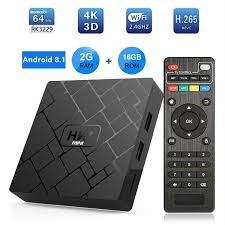
This has everything which may or may not other devices have. It comes with a processor and internal storage RAM; you can connect USB, memory card, or external hard disks directly to it.
These box-type media players also come with inbuilt apps like YouTube, Netflix, Facebook, Amazon Prime, etc. Professional gamers use this by attaching their Xbox, or PlayStation to it which enhances the gaming experience by million times.
It costs nearly around 12500Rs online. Yes! it is more costly than all other devices but it is designed to match every feature of the best smart TVs.
Game Consoles
If you’re a gaming enthusiast, this option might already be at your fingertips. Gaming consoles like PlayStation or Xbox come with built-in smart TV capabilities. Connect your console to your TV, and get ready to unlock a whole new level of entertainment.
All you have to do is connect your Normal TV with this and you will enjoy the features of smart TV.
Now all you have to do is choose a device according to your budget, order it online, and connect it to your TV. If you do not want to spend more money must choose Google chrome cast and if you want to spend some more then amazon fire TV Stick or Apple TV is the best option for you.
Do not choose box-type media players until you need to use their all functions.
Other than these, some so many other companies and brands make devices to convert your TV into Smart TV. But these are the best options available right now in the market.
Setting Up Your Smart TV Device
Now that you have your smart TV device, let’s get it up and running:
- Connect the Device: Using an HDMI cable, connect your chosen smart TV device to an available HDMI port on your TV. Select the corresponding input source on your TV to see the device’s interface.
- Power Up and Configuration: Plug in the power adapter for your smart TV device, and follow the on-screen instructions to configure the initial settings. This may involve connecting to your Wi-Fi network and signing in to your streaming or app accounts, if necessary.
- Update Software: After the initial setup, check for any available software updates for your smart TV device. Keeping the software up to date ensures optimal performance and access to the latest features.
Enhancing Your Smart TV Experience
To take your smart TV experience to the next level, consider these enhancements:
- Wireless Keyboard and Mouse: Simplify typing and navigation by connecting a wireless keyboard and mouse to your smart TV device. Whether you’re searching for content or browsing the web, it will make the process smoother.
- External Speakers or Soundbars: Upgrade your audio experience by connecting external speakers or a soundbar to your smart TV. Immerse yourself in the sound and enjoy a cinematic feel while watching your favorite movies and shows.
- Universal Remote: Reduce clutter and simplify control by using a universal remote. Program it to control your smart TV device, gaming console, and other connected devices. One remote to rule them all!
Conclusion:
Congratulations on successfully upgrading your regular TV to a smart TV! By following this step-by-step guide, you’ve opened the doors to a world of entertainment and convenience. Now, you can stream your favorite shows, access a variety of apps, browse the internet, and personalize your TV experience to suit your preferences. Explore the wealth of features and apps available, and stay updated with future advancements in smart TV technology. Sit back, relax, and enjoy the incredible possibilities of your newly upgraded smart TV!

1 Comment
Without hdmi port how TV convert to smart TV